Cell counts
Shown when: you are not using spatial data. With spatial data, one cell is placed per data row and this screen is skipped.
The question
How many cells of each type to place. The four modes sit side by side as columns — pick one with its radio button.
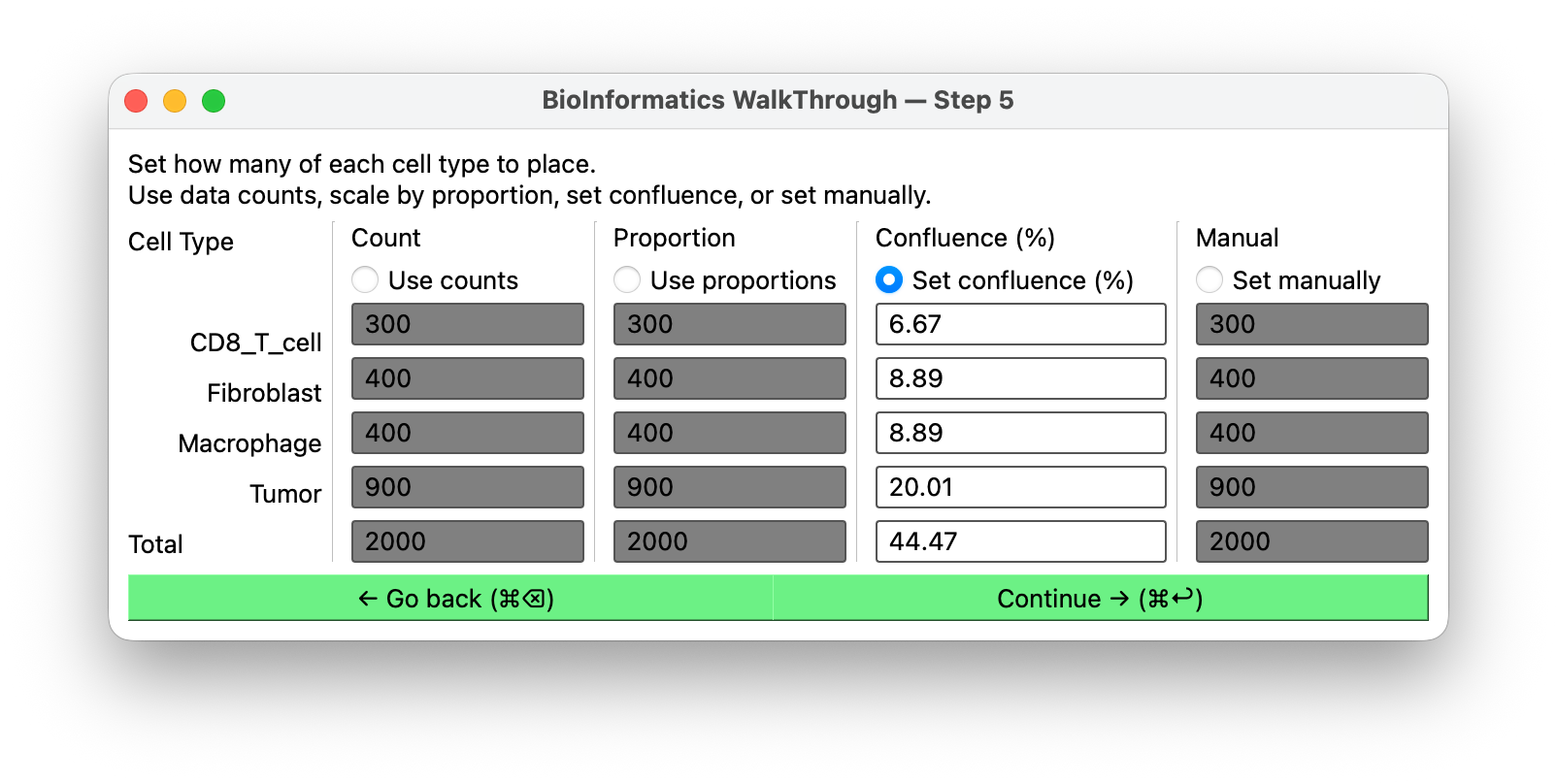
The four modes
Use data counts
Place exactly as many cells of each type as the data contains. If your file has 3,412 tumor cells and 806 T cells, that is what you get.
Use this when the dataset size is already the population size you want to simulate.
Scale by proportion
Keep the observed proportions, change the total. You set a total; BIWT divides it among the types in the same ratios as the data.
A 40,000-cell scRNA-seq experiment is more agents than most simulations want; asking for 4,000 in the same proportions gives you a representative population at a tractable size.
Set confluence (%)
Specify how much of the domain area the cells should cover, as a percentage. BIWT works backwards from the domain area and a per-cell area to a count.
Confluence is the natural currency when what you care about is tissue density rather than an absolute number — "start at 60% confluent" is a statement about the biology; "start with 7,318 cells" is a statement about a specific domain size. The fields are pre-populated from your current counts.
Set manually
Type a count per type. Total control, no coupling between types.
Use this for designed experiments: a defined effector-to-target ratio, a single seeded metastasis, a sensitivity sweep over one population's size.
Rules
Zero is allowed, and it is not the same as deleting. A count of zero means define this
cell type, but place none of it: the type still reaches the host — in cell_type_map, and
with whatever cell template you assigned it — it just contributes no
rows to the coordinates. That is how you pull a phenotype into your model without seeding any
of those cells, useful when the population is meant to appear later, through division or
differentiation, rather than at t = 0.
Deleting the type is the other choice: it removes the type outright, so the host never hears about it.
Every type may be zero if you want, which gives you a config full of cell definitions and an empty positions file.
At the positions screen a zero-count type arrives already grayed out, so it will not hold up Continue.
Counts interact with the domain. A confluence figure is meaningless without a domain area, and a large manual count in a small domain produces heavy overlap. If you are also changing the domain, set it in the domain editor first.